 Reviews on



If you run a WordPress website, chances are you only think about it when something goes terribly wrong. Maybe a page stops loading, a contact form breaks, or the site suddenly looks very different after an update. That’s mostly when people start hearing about “WordPress care plans.”
The fact that a WordPress site needs maintenance is something that often doesn’t cross people’s minds.
Companies usually sell care plans as something every website needs. But that’s not always true. Some websites can survive without a care plan, while others really shouldn’t be running without one.
The real trick is knowing where your website falls.
In this post, we will break down what a WordPress care plan truly means, what it covers, and when it makes sense to invest in one. We are not here to convince you either way (Saying buy one or don’t buy one). We are merely here to help you decide based on how you use your website.
- A WordPress care plan is about regular upkeep, not just fixing problems when they happen.
- Not every WordPress website needs a care plan, but business-critical sites usually do.
- Ongoing updates and monitoring help prevent small issues from becoming bigger ones.
- Care plan saves time for owners who do not want to deal with technical tasks.
- The right care plan depends on how important the website is and how much risk you are willing to take.
What is a WordPress Care Plan?
In simple terms, a WordPress care plan is ongoing help for your website. Instead of fixing things only after they break, the site is checked and maintained properly in a care plan, so problems are less likely to happen.
This usually means keeping WordPress and plugins updated, taking backups, and fixing even small issues like page speed before they turn into bigger ones.
Even if something goes wrong, you already know who to call.
You have to remember that a care plan is not a one-time fix. It is ongoing help to keep your website running properly 24/7, especially without you having to worry about the technical side all the time.
What is Usually Included in a WordPress Care Plan?
Almost all companies’ WordPress care plans cover a few things to help keep a website running without surprises (Bad ones).
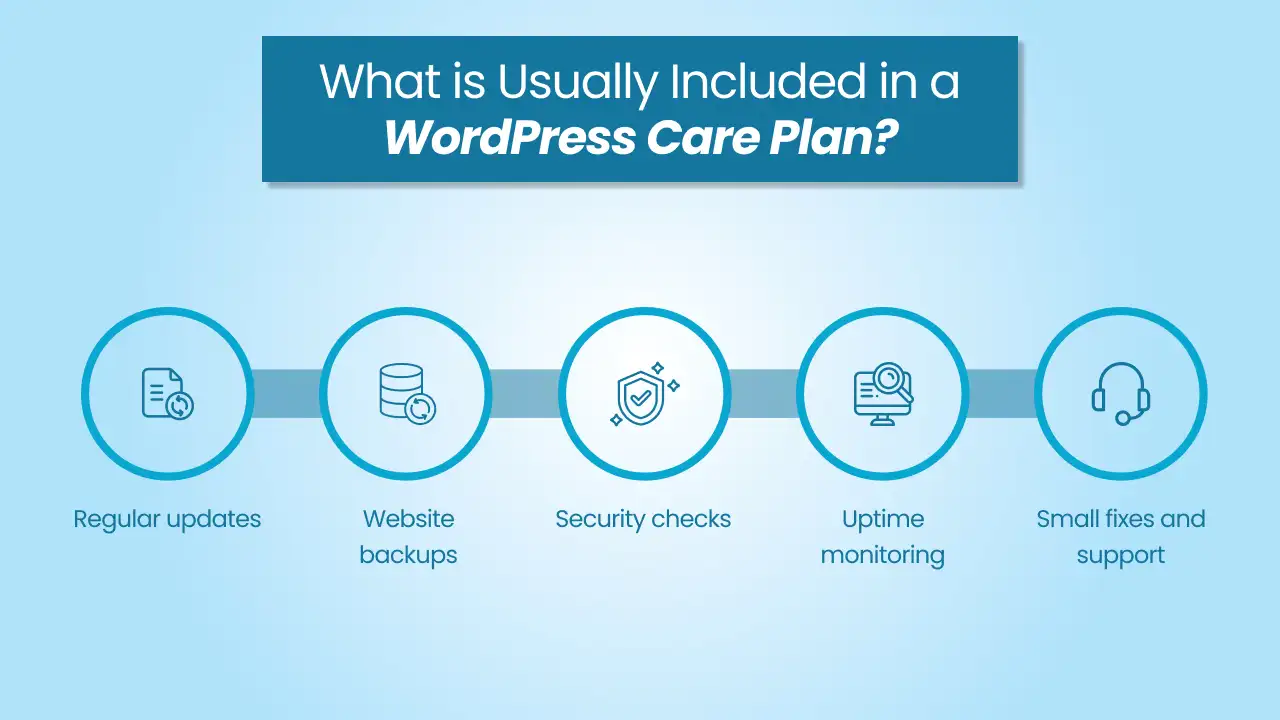
- Regular updates: WordPress, themes, and plugins are updated so the site stays compatible and secure.
- Website backups: Extra copies of your website are taken regularly. In case something breaks, the site can be restored to its original status.
- Security checks: The site is monitored for malware, spam, or any unusual activity to reduce the risk of hacking.
- Uptime monitoring: Someone keeps an eye on whether the site is up and running. If it goes down, it gets noticed immediately.
- Small fixes and support: Minor issues like broken pages, plugin errors, or layout problems are handled without turning them into a new development project.
Talk to the cmsMinds team, and get a clear idea.
Why WordPress Websites Need Ongoing Care
A WordPress website is not something you set up or build once and then just forget about it. Even if you do not change anything on the site (Design, content, images, etc.), things behind the scenes keep changing.
For instance, WordPress releases updates, plugins release updates, hosting environments change, and many more. Now, all these updates are meant to improve security and fix issues, but they can sometimes cause new problems (As I said, sometimes). What happens then?
Over time, these small things can pile up. One day, a plugin may stop working completely. A contact form might stop sending emails. The site may become slower than before.
Ongoing care helps you catch these problems early. It keeps the site up to date, checks that things are still working, and reduces the risk of sudden breakdowns.
This is exactly why many WordPress websites need someone to keep an eye on them, even when nothing goes wrong.
What Happens If You Don’t Have a Care Plan
We are not saying something will definitely break. But when and if that happens, who’s going to help you?
Without a care plan, fixes often become urgent and expensive. Why? Because you may need to contact a WordPress developer, explain the issue from scratch, and wait for them to be available. Just imagine what could have been avoided has now become a huge problem.
Not having a care plan does not automatically mean your site will fail. It only means you are reacting to problems instead of preventing them. For businesses, time is money; this can quickly escalate into something stressful and tedious.
Do All WordPress Websites Need a Care Plan?
Want a simple answer? No, not every WordPress website needs a care plan. It really depends on how important the website is and, most importantly, how often it is used.
If your website is small, rarely updated, or just informational, you may be able to manage without a care plan for some time. Or as long as you are comfortable handling updates and fixing small issues on your own, your website will survive.
On the contrary, if your website supports your business in any real way, things change. Websites that generate leads, handle customer inquiries, show important information, or sell products need more attention. When something breaks on these sites, it affects other people and their work.
A care plan is not really about the size of the website. Rather, it is about responsibility. In other words, if you cannot afford downtime, lost enquiries, or some random unexpected problems, having a care plan makes sense.
Do yourself a favour and be honest about how much your website actually matters to you.
When a WordPress Care Plan Makes Sense
A WordPress care plan usually makes sense when your website plays an important role in your work or business.
Let me break it down how.
- If people rely on your site to contact you, book services, or get information, you probably do not want it to break unexpectedly (Not even for a few minutes).
- If your website brings in leads, enquiries, or sales, even a small issue can cause problems. A problem as small as a broken form, a slow page, or a security issue can result in missed opportunities.
That is exactly why you should have someone always check and maintain the site, so you can save yourself from tremendous amounts of stress.
A few examples of sites are:
- Business websites
- eCommerce sites
- High-traffic sites
- Sites that generate leads or revenue
Care plans are also extremely helpful if you do not have time or interest in dealing with technical tasks. Many owners (Even when they have technical knowledge) prefer to focus on running their business instead of worrying about updates, backups, or fixing some random errors.
When You Might Not Need a WordPress Care Plan
A WordPress care plan may not be necessary for every website. If your site is small, rarely updated, and it’s not really tied closely to your business, you might be just fine without one.
For instance, personal blogs, portfolio websites, or some basic informational sites that can be managed with occasional updates don’t need a care plan. But then you have to make sure that you can update plugins, and even fix small issues when they come up.
Some businesses have in-house technical teams that handle this kind of website maintenance. In such cases, an external care plan won’t be of much help.
A few examples of sites are:
- Small personal sites
- Static or rarely updated sites
- Sites managed fully in-house
No matter what kind of website you have, every website needs some level of attention. Choosing not to have a care plan does not automatically mean doing nothing at all. It just means you are taking full responsibility for updates, backups, and fixes on your own, no matter how small or big they are.
Note: You have to be super realistic about how much time and effort you are willing to put into maintaining the site.
What to Look for in a WordPress Care Plan
First of all, not all care plans are the same. Second, make sure to jot down your requirements, like what you want the person or team to do.
Now, coming to how to choose a good WordPress care plan, look for clarity. Check what is included and what is not in the care plan. You should know exactly what kind of updates, backups, and support you are getting for the money you are paying.
Next, ask how quickly they respond when something goes wrong. If your site has an issue, you should know how soon someone will take a look at it. At any cost, you do not want slow responses, especially if the website is important to your work.
It will be immensely helpful to know who will actually handle your site. Is it a human-led team that understands WordPress site out, or just a basic automated service?
Lastly, check if the care plan fits your website. A personal blog and a busy business site do not need the same level of care.
Choose a plan that matches how your website is used, instead of a one-size-fits-all offer.
DIY vs. Professional WordPress Care Plans
Some people prefer to manage their WordPress website on their own. This usually means handling updates, backups, and fixes whenever something goes wrong.
If you are totally comfortable with WordPress and have the time to keep an eye on your website, you can do it yourself. That being said, this can work great for simpler sites.
However, the challenge with doing it yourself is consistency. Over the years, we have seen people forgetting important updates, restoring backups, etc., until they become bigger problems.
On the other hand, a professional WordPress care plan takes that huge responsibility off your plate. Someone else monitors the site, updates the site, and fixes errors and bugs when they come up. This will be greatly helpful for business websites that cannot afford downtime.
The choice is simple: time, comfort, and risk. If you are confident managing the site and have time to spare, DIY suffices. But if you want peace of mind and fewer things on your plate, a professional care plan is the easier option.
Conclusion
A WordPress care plan is not a must-have for every website. It is, although, a great way to stay on top of things without constantly worrying about updates, errors, or some random issues.
By now, you should have a clear sense of where your website falls and how much attention it needs. Once you figure that out, the final decision becomes easier. Either you handle it yourself, or get someone else to do it for you.
Let cmsMinds take care of updates and fixes for your WordPress site.



