
SEO-Safe WordPress Migration Services
Changing platforms shouldn’t cost you traffic, content or sleep. As a WordPress migration agency, we move your site from any CMS to WordPress with your content, URLs, integrations and SEO intact, and keep your current site live until the new one is ready.
Reviewed by Raj Laddha, CEO & Founder, on

Automattic Pro Partner
15+ years building only on WordPress
Trusted by Businesses That Need WordPress Done Right





Services
Our WordPress Migration Services
These are the nine platforms we move sites from most often. Each migration is planned around what your current site does, not only what it contains.
Wix to WordPress
Pages, blog posts and media move across, and Wix apps are replaced with WordPress plugins or custom blocks. Choose this when you have outgrown Wix’s SEO controls or app limits.
HubSpot to WordPress
Landing pages, blogs and forms are rebuilt in WordPress, with HubSpot kept as your CRM through its official plugin if you want it. Choose this when CMS Hub fees no longer match what you use.
AEM to WordPress
Content models, assets and approval workflows are mapped to custom post types, ACF fields and editorial roles. Choose this when AEM licensing and developer dependency slow your team down.
Shopify to WordPress
Products, customers and order history move to WooCommerce, with variants, SKUs and URLs preserved. Choose this when transaction fees and app costs are eating your margin.
Drupal to WordPress
Nodes, taxonomies, users and media move through scripted imports, and Views are rebuilt as blocks or queries. Choose this when a Drupal upgrade would cost more than a move.
Sitecore to WordPress
Content trees and personalization rules are mapped to a WordPress structure your editors can run without a .NET team. Choose this when renewal is due and adoption is low.
Joomla to WordPress
Articles, categories, menus and users move across, and old extensions are replaced with maintained plugins. Choose this when your Joomla extensions are no longer updated.
Squarespace to WordPress
Content is exported, the design is rebuilt as a custom theme, and URLs are matched or redirected. Choose this when you need features Squarespace cannot add.
Webflow to WordPress
CMS collections become custom post types, and your Webflow design is rebuilt in Gutenberg/ACF blocks. Choose this when editors need more control or plan limits get in the way.

The basics
What Is WordPress Migration?
WordPress migration is moving your website from another platform, such as Wix, Drupal, HubSpot, AEM or Sitecore, to WordPress, with its content, media, users, URLs, SEO metadata and features intact.
A migration is more than copying pages. Every indexed URL needs a new address and a tested redirect, metadata has to come across, and features like forms, apps and integrations have to be rebuilt as WordPress functionality. Skip any of these and rankings, leads or workflows drop after launch.
At cmsMinds, we plan every move by hand. We audit what your current site does, map each page to its new WordPress address, and keep your old site live and backed up until the new one is tested and approved. That is how we protect your data and keep your site online during the move.
Why WordPress
Why Migrate to WordPress?
Most teams move to WordPress for the same reasons: lower running costs, more control over content and SEO, and a platform their editors can actually use. Here is what changes when your site moves across.
Request a free migration audit-
WordPress runs more than 40% of the web, so hosting, developers and support are easy to find.
-
A large range of plugins covers almost any feature you need, with custom development for anything that is missing.
-
Custom post types, blocks and plugins let your site add features without hitting a closed platform’s limits.
-
Your team updates pages, adds posts and builds layouts with blocks made for your content, without a developer.
-
WordPress gives you a solid base for search visibility, with full control over URLs, metadata, schema, and site structure.
-
WordPress is open source, so there are no heavy licensing fees. You save in the long run and keep full control of your site.





SEO protection
What Happens to Your SEO During a WordPress Migration
Rankings drop after a migration when URLs change without redirects or metadata gets left behind. We treat SEO as part of the migration scope from day one.
Request a migration auditEvery URL Mapped
We crawl your current site and match every indexed URL to its new WordPress address before any content moves.
301 Redirects Tested
Every old Wix, Drupal or HubSpot URL pattern gets a 301 rule, tested on staging with a full crawl before launch.
Metadata Carried Over
Page titles, meta descriptions, canonical tags, alt text and schema move with the content.
Internal Links Updated
Hard-coded links, menus and embedded media paths are rewritten to WordPress permalinks, so no page routes through a redirect chain.
Search Console Monitored
In the weeks after launch we track crawl errors, index coverage and rankings in Google Search Console, and fix issues as they appear.
Planned vs. plugin migration
Planned WordPress Migration or a Plugin Export?
Migration plugins can copy a simple site. They do not map URLs, rebuild features, or check what changed for search engines.
| Factor | Plugin or quick export | Migration from cmsMinds |
|---|---|---|
| Content | Copied in bulk, and formatting often breaks | Mapped to the right post types and fields |
| URLs | Changed, with redirects missed | Every indexed URL mapped and redirected |
| Features | Forms, filters and integrations left behind | Rebuilt or replaced with maintained plugins |
| Downtime | Site offline during the switch | Old site live until you sign off |
| SEO | Metadata and schema often lost | Titles, descriptions and schema carried over |
| After launch | You find the broken pages | Search Console monitored and fixes applied |
Why cmsMinds
A WordPress Migration Agency You Can Rely On
We have moved sites of every size to WordPress, from small business sites to multi-brand platforms, and we stay on after launch.
Full-service migration partner
Planning, content mapping, rebuild, SEO, testing and launch handled by one team, with no handoffs between vendors.
Migration specialists
Migration account managers, data specialists and QA engineers who plan each step and check every page before launch.
Dedicated Account Manager
One Account Manager owns your migration plan, from content inventory to DNS cutover, and tells you what moves next.
Old site live until sign-off
Your current site stays live while we build and test on staging. The switch happens only after you sign off.
Better than before
We fix speed, accessibility and structure issues during the move, so the new site starts on a faster, cleaner base.
Support after the move
Updates, security, backups and performance checks continue after launch through our maintenance plans.
Automattic Pro Partner
What Automattic Pro Partner Status Means for Your Migration
Our partnership with Automattic, the company behind WordPress.com, WooCommerce, and Jetpack, gives us direct access to product teams, premium tools, and the latest updates. For you, that means faster, more reliable migrations onto hosting built for WordPress.
-
 Flexible content management at any scale.
View our listing ↗
-
 Premium WordPress hosting for speed, uptime, and support.
View our listing ↗
-
 Security, backups, and performance built into WordPress.
View our listing ↗
-
 The most customizable ecommerce platform for WordPress.
View our WordPress.com listing ↗
(opens in a new tab)
Case studies
WordPress Migration Case Studies
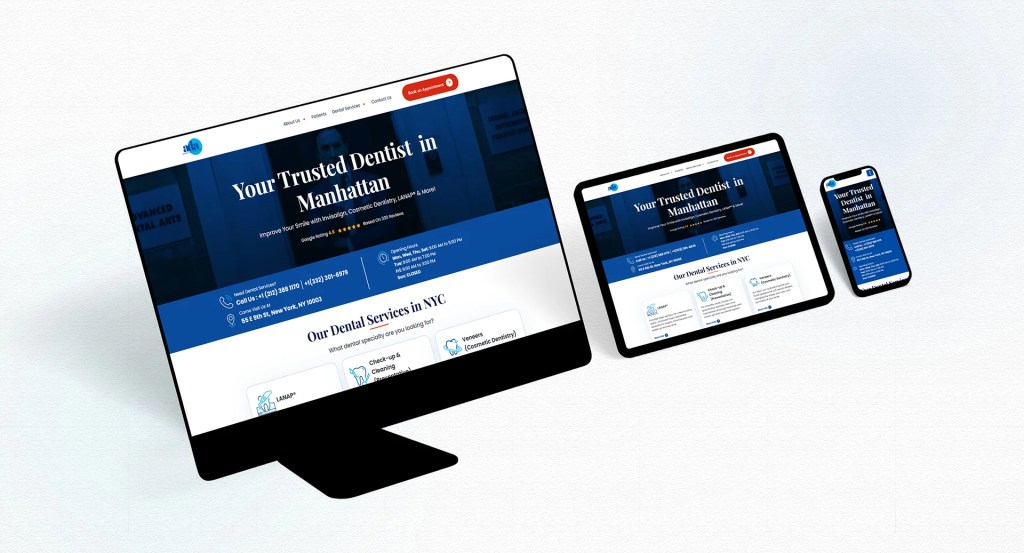
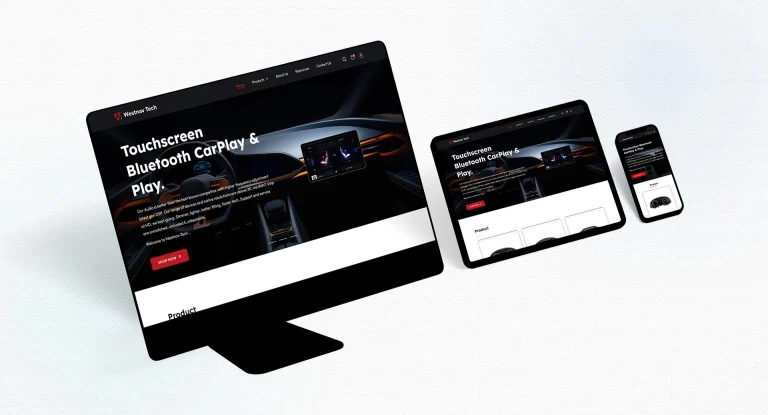
Sites we have moved to WordPress, and what changed after launch.


Your team
Meet Your Migration Experts
Your migration is handled by real people who plan every step, not a plugin running in the background.
-

Vishal Sharma
Sr. Project Manager
Vishal keeps communication, timelines, project priorities, and weekly progress updates organized from start to launch.
-

Krupal Panchal
WordPress Tech Lead
Krupal leads the technical side of WordPress builds, from architecture decisions to custom theme and plugin development.
-

Sunil Kabra
Sr. Systems Engineer
-

Vikram Singh
Sr. SEO Manager
-

Bharat Gohel
Delivery Head
For 10+ years, Bharat has led delivery at cmsMinds, making sure client projects ship on time, done right, and without surprises along the way.
Process
Our WordPress Migration Process
Five stages, from content inventory to post-launch monitoring, each signed off by you before the next begins.
-
01. Assess
We audit your current site: every page, URL, content type, feature and integration. You get a written inventory of what moves, what gets rebuilt and what can be retired.

-
02. Plan
We map content to WordPress post types and fields, build the URL redirect map, and set a timeline with milestones you approve before work begins.

-
03. Migrate
Content moves through scripted imports with manual checks, the design is rebuilt as a custom theme, and features and integrations are recreated on staging.

-
04. Launch
We test every template, form, redirect and integration on staging. After your sign-off, DNS is switched in a low-traffic window while the old site stays as a backup.

-
05. Support
We monitor Google Search Console and site performance after launch, fix anything that comes up, and hand over to a maintenance plan if you want ongoing care.

Engagement and pricing
How to Work With cmsMinds, and What WordPress Migration Costs
Migration cost depends on page count, content types, custom features and integrations. You get a fixed written estimate after a free migration audit, before any content moves.
Project-Based Migration
Starting at $5,000
A full move to WordPress delivered as one fixed-price project. One team handles the audit, content mapping, rebuild, redirects and launch, with training at handover.
- Fixed written estimate after discovery
- Priced by page templates and integrations
- One team from discovery to launch
Phased Migration
10–40+ hours a month
Move one site, section or brand at a time through monthly hours. Suited to large platforms and multisite networks that cannot switch over in one go.
- No long-term contract required
- Old and new platforms run side by side
- Each phase signed off before the next
Hire a WordPress Developer
Part Time & Full Time
Add a cmsMinds developer directly to your team, working in your tools and on your schedule. Best for agencies and in-house teams that need reliable development capacity.
- Managed by cmsMinds
- US-based Account Manager
- Scale up or down by month
Want a ballpark before the call? Get a rough estimate in about two minutes.
Try the cost calculatorClient reviews
Client Reviews of Our WordPress Migration Work
“We recently had changed over our WordPress back-end management and web hosting to cmsMinds. The migration was seamless. Everything went as planned and there was no downtime to the site. Since switching over to cmsMinds, they have been nothing been prompt in there responses, flexible, and very much a pleasure to work with. Their team is responsive, and Raj makes sure to that I as a client am getting the best service I can get with them. For peace of mind, choose cmsMinds.”
 Elias Moreno
-
“I hired CMSmind to help me migrate my squarespace website to wordpress. Their team was incredibly responsive and completed the work very fast. I would definitely use them again.”
 Sam Goodman
-
“cmsMinds has done a great job with continually updating our website and making changes to help increase our results. They are responsive and consistent, producing excellent work and earning a high recommendation.”
 Scott Letourneau
-
“cmsMinds is a team of professional web developers that is a great pleasure to work with. They are very responsive and highly skilled. They have been able to help me with all my companies web related projects. I plan to work with them for many years to come.”
 Suave Kajko
Planning a Move to WordPress?
Request a free migration audit. We will review your current site and tell you what moves easily, what needs rebuilding, and what it will cost. Your current site stays live and backed up until the new one is approved.
FAQ
WordPress Migration FAQs
Answers to the questions we hear most before a move to WordPress.
How much does WordPress migration cost?
Every WordPress migration with cmsMinds is quoted as a fixed price after a free audit, so you know the full cost before any content moves. Migrations start at $5,000, and most cost $10,000–$100,000. A site rebuilt with 5 to 10 page templates usually runs $10,000–$25,000. Page count, content types, custom features and integrations decide where your site falls in that range.
How long does a WordPress migration take?
Most migrations take 2 to 6 weeks. A small Wix or Squarespace site sits at the shorter end. Sites with thousands of pages, custom features, or CRM and ERP integrations take longer, and enterprise moves from AEM or Sitecore are often phased over several months. You get a written timeline with the fixed written estimate, planned back from your launch date.
Is there a Wix to WordPress migration service?
Yes. A Wix to WordPress migration moves your pages, blog posts, images and SEO metadata, then rebuilds the features Wix handled for you, such as forms, bookings or a store, in WordPress. Wix has no full-site export, so content is extracted and checked page by page. Every Wix URL is redirected to its new address so your rankings can carry over.
What is the best way to migrate a website to WordPress?
The safest way is a planned migration: inventory every page and feature, map each URL to its new address, move content to a staging site, rebuild features, test, then switch DNS in a low-traffic window with 301 redirects live. Your old site stays online until the new one is approved. Skipping the inventory or redirect steps is what usually causes lost rankings.
What is the best WordPress site migration tool, or do I need a service?
For moving an existing WordPress site between hosts, plugins such as Duplicator, All-in-One WP Migration and Migrate Guru work well on simple sites. No plugin can move a site cleanly from another platform, map changed URLs or rebuild features. When you are leaving Wix, Drupal, HubSpot or Sitecore, a WordPress site migration service handles the parts a tool cannot.
Will my website be offline or lose data during the migration?
Your site should not go offline. Your current site stays live while the new WordPress site is built and tested on staging, and both are backed up before the switch. DNS changes are scheduled for a low-traffic window, so most visitors never notice. Until the new site is confirmed stable, the old site remains available to fall back on.
What happens to my SEO rankings when I migrate?
We map every indexed URL to its new address, set up and test 301 redirects, and carry over titles, meta descriptions, canonical tags, alt text and schema. After launch, we monitor Google Search Console and fix crawl errors. Some short-term movement is normal while Google recrawls, and rankings usually settle within a few weeks when redirects are complete.
Do you rebuild custom features and integrations?
Yes. We audit what your current site does, then rebuild each feature in WordPress using custom blocks, custom plugins or maintained third-party plugins. Integrations with your CRM, email platform, analytics and payment tools are reconnected and tested on staging before launch. Features are listed in the quote, so nothing your team relies on is forgotten.
How do I choose a WordPress migration agency?
Choose a WordPress migration agency that audits your current site before quoting, gives a fixed price and timeline in writing, and can show migrations from the platform you are leaving. Ask how it handles redirects, integrations and editor training, and what support follows launch. Be wary of quotes that only mention moving content, because features and SEO are where migrations usually go wrong.
What support is there after the migration?
Every migration includes a post-launch support window for fixes and adjustments while your team settles in, plus a walkthrough of the new dashboard. After that, you can move to a WordPress maintenance plan from $100 a month for updates, backups and security monitoring, or manage the site yourselves. You own the new site and all its content.

WordPress services
Our WordPress Services
Everything we build and support on WordPress, from custom development and migrations to maintenance and performance work.