 Reviews on


A surprising number of “custom WordPress websites” are actually a site built and customized in Elementor. Customizing a page builder isn’t custom development, that’s customizing a pre-built starting point, not writing a theme in code.
Custom WordPress development means building a site’s theme from code, shaped around one specific business. It’s the difference between a site that fits your brand and workflow exactly, and one assembled from parts written for a different business than yours.
This guide covers what that actually looks like: what’s included, what it delivers, what it costs, and why it’s the stronger long-term investment for a business that plans to grow.
60-Second Summary
- Custom WordPress development means a theme built from code for one business, not customized from a pre-built starting point. That difference shows up directly in performance, editing experience, and long-term cost.
- It typically costs $10,000 to $100,000, depending on page count and complexity: under $20k for 5-10 pages, $20k-50k for 10-25 pages, $50k-100k for 25+ pages or complex integrations.
- What it actually delivers: performance, scalability, SEO groundwork, accessibility, responsiveness, editability for marketing teams, and security, seven real outcomes, not a certification checklist.
- The process starts at design, not code. Discovery and design decisions made before development starts are what most often separate a smooth build from a difficult one.
- The real decision most guides skip: whether to hire an agency for a managed project, or hire and manage your own team. That choice matters as much as the build itself.
What Custom WordPress Development Actually Is
Custom WordPress development is the process of building a website’s design, theme, and functionality from code for one specific business, rather than adapting a pre-built theme or page builder template.
It covers three parts that work together, not three separate options to pick from: custom design, custom theme development, and custom plugin development.
Custom Design
Design comes first, before any code gets written. That means understanding:
- The business itself, what it does and how it operates
- Its audience and customers, who the site actually needs to work for
- Its long-term vision, not just what it needs at launch
Development follows design, not the other way around. The common assumption is that custom development is mainly a coding exercise. In practice, the code executes decisions made during design, decisions a template can’t make because it was never built with this business in mind.
Custom Theme Development
This is the largest part of most custom builds. The theme, the part of a site controlling layout, structure, and how content displays, gets written in code specifically for the business, not adapted from a pre-made template or assembled through a page builder’s visual interface.
A custom-coded theme is what makes the outcomes in the next section possible. Performance, scalability, SEO groundwork, accessibility, responsiveness, editability, and security all trace back to how cleanly the theme itself is built.
There are two technical approaches to building a custom theme, and it’s worth knowing which one you’re getting:
- Classic themes use PHP template files to structure the site, paired with Advanced Custom Fields (ACF) to give editors clean, purpose-built fields for their content. This has been WordPress’s standard approach for most of its history, and it’s what cmsMinds uses for most custom sites at this scale.
- Block themes, built around Full Site Editing (FSE), use theme.json and block-based templates instead, extending the same block editor that handles post content to headers, footers, and entire page layouts. It’s the more modern approach and where WordPress itself is heading, but it’s a heavier technical lift that tends to make more sense on larger, more complex builds.
Either approach can deliver a genuinely custom, code-built theme. What matters is that a developer can tell you which one you’re getting and why, not that one is universally right. Our guide to building WordPress websites with Gutenberg blocks covers both approaches in more depth.
Custom Plugin Development
A theme controls how a site looks. A plugin controls how it behaves.
Custom plugin development covers business logic a generic plugin can’t handle:
- Custom approval workflows
- Role-based permissions beyond WordPress’s defaults
- Integrations with a CRM, booking system, or other business tool
- Automated processes specific to how the business runs
Functionality built into a plugin survives a future redesign untouched, since plugins and themes are built to stay independent of each other. Not every custom project needs plugin work, many need only a custom theme, but when a business process doesn’t match anything a generic plugin does, this is where it gets solved.
Do You Need Custom Development?
Not every business does. Custom development is usually worth it when two or more of these are true:
- Your brand identity is central to your competitive advantage, and generic templates keep making your site look like everyone else’s
- You need specific functionality, a booking system, a calculator, a member portal, that no plugin handles well without heavy, fragile customization
- Site speed directly affects your revenue or lead volume
- You’re planning real growth over the next two to three years and don’t want to rebuild when you outgrow the current site
- Your team keeps hitting workarounds and compromises just to make the current setup do what the business needs
- The site needs to connect to internal systems, a CRM, inventory, or booking software, in ways a generic plugin can’t handle
If none of these sound familiar yet, custom development may be more than the business needs right now. Most businesses that answer yes to two or more of these are already past the point where a template can keep up.
What It Delivers
Custom WordPress development is built around seven outcomes, each one a property of the build itself, not a marketing claim:

Performance. A custom theme generates only the code a page actually needs. Page builder output has been measured at 15 to 30 points lower on Google PageSpeed Insights than a comparable custom build on the same hosting, the extra CSS, JavaScript, and markup a builder generates has to load before the page is usable.
Letters to the Presidents, a custom WordPress site cmsMinds built for the National Archives Foundation, scores a 97 on Performance & perfect 100 on Accessibility, Best Practices, and SEO in Google PageSpeed Insights, with Core Web Vitals passing across every metric: a 0.6 second Largest Contentful Paint, 21ms Interaction to Next Paint, and zero Cumulative Layout Shift. That’s not a claim, it’s a live, checkable report. Our guide to building WordPress websites with Gutenberg blocks covers the code-level side of this in more depth.
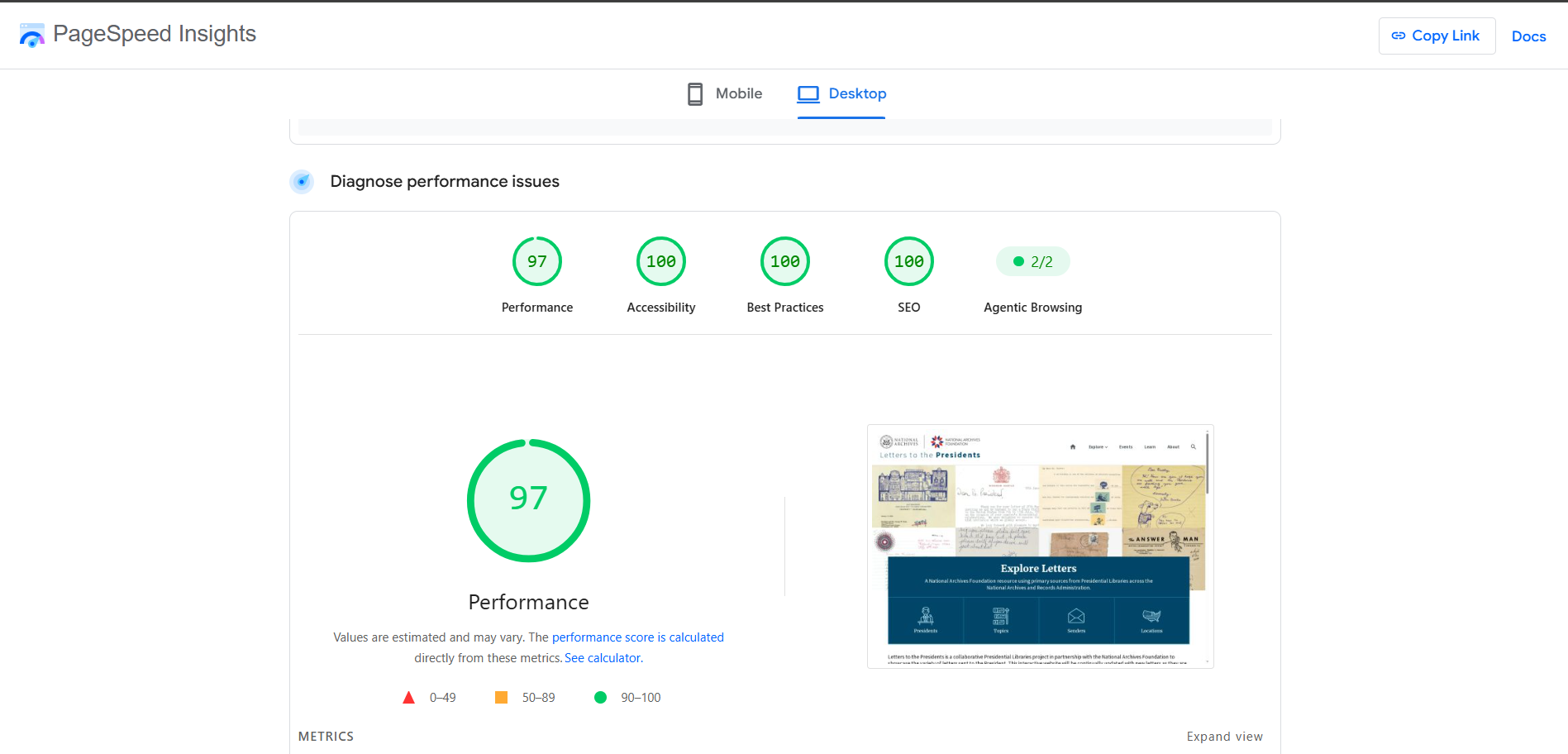
Scalability. A site built around its own content structure, not a generic template’s assumptions, can add new page types, features, and sections without fighting the theme underneath. That matters most a year or two in, once the business has grown past what it needed at launch.
SEO. Clean, semantic markup, no unnecessary divs, no builder-generated bloat, gives search engines a clearer structure to read. This is a foundation SEO builds on, not a substitute for the work itself.
Accessibility. WCAG-aligned markup is easier to build correctly into custom, purpose-built templates than to retrofit into a stack of generic plugin and page builder output, where accessibility depends on how well each third-party piece was coded. Letters to the Presidents, referenced above, scores a perfect 100 on Accessibility in the same PageSpeed report.
Responsiveness. A custom build is designed for how content actually needs to behave across screen sizes, not adapted from breakpoints a template guessed at for a generic audience.
Editability for marketing teams. This is the one people underestimate most. A well-built custom theme gives editors exactly the fields relevant to their content, ACF fields and custom post types built around real content types, not a page builder’s full toolkit of options most of which they’ll never use. Fewer, more relevant options means fewer mistakes and faster publishing, not less control.
Security. Fewer moving parts means a smaller attack surface. A custom-coded theme depends on far fewer third-party plugins than a page-builder-plus-plugin-stack site, and a codebase that isn’t shared across thousands of other installations isn’t the same kind of pre-packaged target that a popular premium theme or plugin is. Security still takes deliberate practice on top of that, clean coding standards, sanitized inputs, and regular updates, but a smaller, custom codebase gives that practice less to go wrong.
From our projects, Raj Laddha The businesses that get the most value from custom development are usually the ones who came in assuming it was mainly about design. It’s actually about giving the content team a tool built for their specific content, not a general-purpose one they have to work around.
Custom vs. Page Builders and Templates
A page builder like Elementor builds pages through a visual, drag-and-drop interface layered on top of a theme someone else wrote. It gets pages live without writing code.
What it doesn’t do is disappear once the site is live. The builder’s own CSS, JavaScript, and markup load on every page it touches, whether or not that page uses its full feature set.
Custom development removes that layer entirely. The theme is written in code for one business, so there’s no builder engine running underneath, no generic feature set most pages never use, and no third-party plugin standing between a content edit and the page going live.
| Factor | Custom Development | Page Builder |
|---|---|---|
| Initial cost | Higher | Lower |
| Page speed | Faster, minimal code overhead | Slower, builder code loads on every page |
| Editing experience | Purpose-built fields for your content | Generic toolkit, most options go unused |
| Long-term cost | No recurring plugin fees, no compatibility breaks | Ongoing plugin licenses, updates can break layouts |
The long-term cost line matters most, and it’s the one that gets skipped most often.
- Custom development avoids the recurring premium plugin fees and compatibility breaks that surface two or three years into a page builder site’s life, the kind of cost that doesn’t show up in an initial quote but shows up on every renewal after.
- A custom build’s cost is mostly front-loaded and done.
- A page builder’s cost keeps recurring, and it compounds with every plugin update and theme change made along the way.
What this looks like in practice: cmsMinds recently rebuilt Bowlus, a heritage luxury travel trailer brand, off a site running SiteOrigin Page Builder on top of an outdated theme, 50+ active plugins, and PHP 7.4, years past its end-of-life support. The rebuild moved to a modern, block-based foundation with a dramatically reduced plugin stack and a full technical cleanup. The results:
- PageSpeed 95 on desktop, 90 on mobile, with near-perfect Core Web Vitals
- SEO and AI visibility up 18%
- Conversions up 24%
- 988 blog URLs restructured, 119 broken links and 24 canonical issues fixed along the way
That’s the compounding cost of a page-builder-and-plugin stack made visible: by the time a site needs this kind of rebuild, the fix touches performance, SEO, and years of accumulated technical debt at once, not just a redesign.
What It Actually Costs
Custom WordPress development typically runs $10,000 to $100,000, and the range is wide because page count and complexity move it a lot:
| Site Scope | Typical Cost |
|---|---|
| 5-10 page templates | Under $20,000 |
| 10-25 page templates | $20,000-$50,000 |
| 25+ page templates, complex integrations, or advanced content architecture | $50,000-$100,000 |
A standard business site in the 5-10 page range typically takes 4 to 6 weeks from kickoff to launch. Larger, more complex builds run longer.
What drives that timeline is the same as what drives cost: how many page templates need designing, how much custom functionality is involved, and whether the site needs to integrate with other systems.
One thing worth stating plainly: you own the code, content, and data. No vendor can change the terms, raise prices, or shut down a platform you depend on. If you ever leave the agency that built it, the codebase goes with you, and any qualified WordPress developer can pick it up.
The build cost above isn’t the only cost. Plan for these ongoing costs too, they exist regardless of which agency builds the site:
- Domain registration, annual, independent of hosting
- Hosting, monthly or annual, scales with traffic and performance needs
- SSL certificate, often included with quality hosting, sometimes a separate line item
- Backups, an automated backup service for disaster recovery
- Ongoing development and maintenance, covered in the Process section below
The Process
A custom WordPress build runs through five stages, and the order matters:
-
Discovery. Understanding the business, its audience, and what the site actually needs to do. This is where requirements get surfaced, not assumed, and it’s as important as design itself, not a formality before the real work starts. Deliverable: a documented scope and requirements list.
-
Design. Translating what discovery surfaced into an actual visual and structural plan, page templates, content types, user flows, before any code gets written. Deliverable: approved page templates and a component library.
-
Development. Building the theme from code against the approved design, plus any custom plugin work the project needs. Deliverable: a fully built site on a staging environment, not yet public.
-
QA. Testing functionality, responsiveness, and performance against the approved scope before launch. Deliverable: a tested, approved site ready to go live.
-
Launch and support. Going live, followed by ongoing updates, monitoring, and improvements. A website isn’t finished at launch. Deliverable: a live site plus an ongoing maintenance plan.
A typical team for a project at this scale includes:
- Project Lead
- UI/UX Designer
- Frontend Developer
- Senior Backend WordPress Developer (often the technical lead on the project)
- QA
That’s fewer roles than a large enterprise build needs, but the same principle applies: a custom site is built by people with distinct specializations, not one generalist covering everything.
Watch out: customizing a page builder isn’t custom development: This is the most common confusion in this entire topic. Building and customizing a site in Elementor or a similar page builder means the underlying theme was never written for your business; it’s a generic starting point being customized through the builder’s interface, not code written specifically for you.
The practical difference shows up immediately in performance and long-term editing experience: a page builder site carries the builder’s own code on every page it touches, whether you use its full feature set or not, and that’s where the bloat custom development avoids actually comes from.
Managed Project vs. Hiring and Managing Your Own Team
There’s a decision buried inside “should I get custom development” that most guides skip entirely: are you hiring an agency to manage the project, or hiring individual developers and managing it yourself?
Hiring your own team, freelancers, or in-house developers can cost less on paper. It also means you take on:
- Project management and coordination between design and development
- Accountability for hitting scope and timeline
- Solving it yourself if a freelancer disappears mid-project or a deadline slips
A managed project with an agency shifts all of that. The agency owns the PM function, the coordination, and the outcome. A Project Lead is accountable for the project, instead of you becoming your own PM on top of your actual job.
Neither option is universally right:
- A company with real internal project management capacity can do well hiring individually
- A company that wants the outcome without taking on the coordination work is usually better served by a managed engagement
If you’re evaluating which specific agency to hire either way, our guide to choosing a WordPress development company covers that decision in more depth.
Talk to cmsMinds about a project scoped to what your business actually needs, not a generic quote.
Common Mistakes
The single most common mistake in this topic is calling a site customized in Elementor "custom," covered in the callout above. Two more worth naming:
- Underestimating ongoing maintenance. A custom site still needs WordPress core updates, security patching, and occasional improvements. "Custom" doesn’t mean "finished forever," it means built to be maintained cleanly instead of patched around plugin dependencies.
- Skipping discovery to save time. Development that starts before the business and its content needs are actually understood tends to need rework later, the opposite of the time it was meant to save.
Conclusion
For a business owner deciding what to build on, the real comparison isn’t the sticker price of a template versus a custom build. It’s the sticker price today against the cost of the rebuild later.
Bowlus found this out directly. Years on a page builder and a growing stack of plugins ended in exactly the kind of rebuild this guide has been describing, technical debt, falling search visibility, and Core Web Vitals problems masked rather than fixed.
The numbers after moving to a real foundation were concrete: a 24% lift in conversions and an 18% lift in SEO and AI visibility. That’s the return a front-loaded investment in custom development actually buys, not a nicer-looking site, a site that isn’t quietly losing conversions and rankings while it waits to be rebuilt in two or three years.
Since 2010, cmsMinds has been a trusted enterprise WordPress agency delivering custom solutions for businesses of all sizes, including enterprise organizations with complex, scalable digital requirements.


